
seal_text_detection.en.md 21 KB
comments: true
Seal Text Detection Module Tutorial
I. Overview
The seal text detection module typically outputs multi-point bounding boxes around text regions, which are then passed as inputs to the distortion correction and text recognition modules for subsequent processing to identify the textual content of the seal. Recognizing seal text is an integral part of document processing and finds applications in various scenarios such as contract comparison, inventory access auditing, and invoice reimbursement verification. The seal text detection module serves as a subtask within OCR (Optical Character Recognition), responsible for locating and marking the regions containing seal text within an image. The performance of this module directly impacts the accuracy and efficiency of the entire seal text OCR system.
II. Supported Model List
The inference time only includes the model inference time and does not include the time for pre- or post-processing.
| Model Name | Model Download Link | Hmean(%) | GPU Inference Time (ms) [Normal Mode / High-Performance Mode] |
CPU Inference Time (ms) [Normal Mode / High-Performance Mode] |
Model Storage Size (MB) | Description |
|---|---|---|---|---|---|---|
| PP-OCRv4_server_seal_det | Inference Model/Training Model | 98.40 | 124.64 / 91.57 | 545.68 / 439.86 | 109 | The server-side seal text detection model of PP-OCRv4 boasts higher accuracy and is suitable for deployment on better-equipped servers. |
| PP-OCRv4_mobile_seal_det | Inference Model/Training Model | 96.36 | 9.70 / 3.56 | 50.38 / 19.64 | 4.6 | The mobile-side seal text detection model of PP-OCRv4, on the other hand, offers greater efficiency and is suitable for deployment on end devices. |
Test Environment Description:
  <li><b>Performance Test Environment</b>
      <ul>
           <li><strong>Test Dataset:</strong> A Self-built Internal Dataset, Containing 500 Images of Circular Stamps.</li>
          <li><strong>Hardware Configuration:</strong>
              <ul>
                  <li>GPU: NVIDIA Tesla T4</li>
                  <li>CPU: Intel Xeon Gold 6271C @ 2.60GHz</li>
              </ul>
          </li>
          <li><strong>Software Environment:</strong>
              <ul>
                  <li>Ubuntu 20.04 / CUDA 11.8 / cuDNN 8.9 / TensorRT 8.6.1.6</li>
                  <li>paddlepaddle 3.0.0 / paddleocr 3.0.3</li>
              </ul>
          </li>
      </ul>
  </li>
  <li><b>Inference Mode Description</b></li>
| Mode | GPU Configuration | CPU Configuration | Acceleration Technology Combination |
|---|---|---|---|
| Normal Mode | FP32 Precision / No TRT Acceleration | FP32 Precision / 8 Threads | PaddleInference |
| High-Performance Mode | Optimal combination of pre-selected precision types and acceleration strategies | FP32 Precision / 8 Threads | Pre-selected optimal backend (Paddle/OpenVINO/TRT, etc.) |
III. Quick Integration
❗ Before quick integration, please install the PaddleOCR wheel package. For detailed instructions, refer to PaddleOCR Local Installation Tutorial。
Quickly experience with just one command:
paddleocr seal_text_detection -i https://paddle-model-ecology.bj.bcebos.com/paddlex/imgs/demo_image/seal_text_det.png
Note: The official models would be download from HuggingFace by default. If can't access to HuggingFace, please set the environment variable PADDLE_PDX_MODEL_SOURCE="BOS" to change the model source to BOS. In the future, more model sources will be supported.
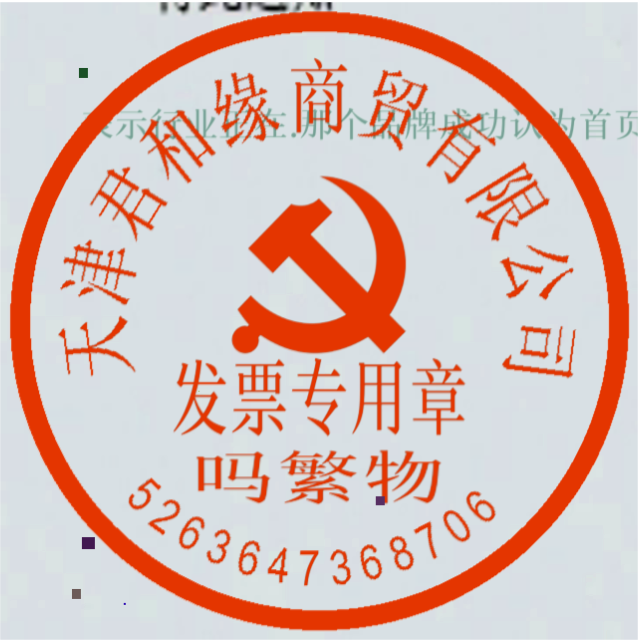
You can also integrate the model inference from the layout area detection module into your project. Before running the following code, please download Example Image Go to the local area.
from paddleocr import SealTextDetection
model = SealTextDetection(model_name="PP-OCRv4_server_seal_det")
output = model.predict("seal_text_det.png", batch_size=1)
for res in output:
    res.print()
    res.save_to_img(save_path="./output/")
    res.save_to_json(save_path="./output/res.json")
After running, the result is:
{'res': {'input_path': 'seal_text_det.png', 'page_index': None, 'dt_polys': [array([[463, 477],
       ...,
       [428, 505]]), array([[297, 444],
       ...,
       [230, 443]]), array([[457, 346],
       ...,
       [267, 345]]), array([[325,  38],
       ...,
       [322,  37]])], 'dt_scores': [0.9912680344777314, 0.9906849624837963, 0.9847219455533163, 0.9914791724153904]}}
The meanings of the parameters are as follows:
-
input_path:represents the path of the input image to be predicted -
dt_polys:represents the predicted text detection boxes, where each text detection box contains multiple vertices of a polygon. Each vertex is a list of two elements, representing the x and y coordinates of the vertex respectively -
dt_scores:represents the confidence scores of the predicted text detection boxes
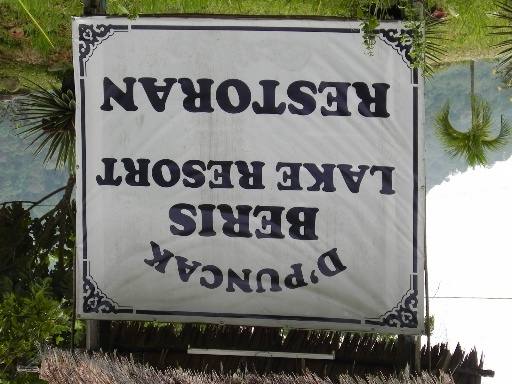
The visualization image is as follows:

The explanations of related methods and parameters are as follows:
SealTextDetectioninstantiates a text detection model (here we takePP-OCRv4_server_seal_detas an example), and the specific explanations are as follows:Parameter Description Type Default model_nameMeaning:Model name.
Description: If set toNone,PP-OCRv4_mobile_seal_detwill be used.str|NoneNonemodel_dirMeaning:Model storage path. str|NoneNonedeviceMeaning:Device for inference.
Description: For example:"cpu","gpu","npu","gpu:0","gpu:0,1".
If multiple devices are specified, parallel inference will be performed.
By default, GPU 0 is used if available; otherwise, CPU is used.str|NoneNoneenable_hpiMeaning:Whether to enable high-performance inference. boolFalseuse_tensorrtMeaning:Whether to use the Paddle Inference TensorRT subgraph engine.
Description: If the model does not support acceleration through TensorRT, setting this flag will not enable acceleration.
For Paddle with CUDA version 11.8, the compatible TensorRT version is 8.x (x>=6), and it is recommended to install TensorRT 8.6.1.6.boolFalseprecisionMeaning:Computation precision when using the TensorRT subgraph engine in Paddle Inference.
Description: Options:"fp32","fp16".str"fp32"enable_mkldnnMeaning:Whether to enable MKL-DNN acceleration for inference.
Description: If MKL-DNN is unavailable or the model does not support it, acceleration will not be used even if this flag is set.boolTruemkldnn_cache_capacityMeaning:MKL-DNN cache capacity. int10cpu_threadsMeaning:Number of threads to use for inference on CPUs. int10limit_side_lenMeaning:Limit on the side length of the input image for detection.
Description:intspecifies the value. If set toNone, the model's default configuration will be used.int|NoneNonelimit_typeMeaning:Type of image side length limitation.
Description:"min"ensures the shortest side of the image is no less thandet_limit_side_len;"max"ensures the longest side is no greater thanlimit_side_len. If set toNone, the model's default configuration will be used.str|NoneNonethreshMeaning:Pixel score threshold.
Description: Pixels in the output probability map with scores greater than this threshold are considered text pixels. Accepts any float value greater than 0. If set toNone, the model's default configuration will be used.float|NoneNonebox_threshMeaning:If the average score of all pixels inside the bounding box is greater than this threshold, the result is considered a text region.
Description: Accepts any float value greater than 0. If set toNone, the model's default configuration will be used.float|NoneNoneunclip_ratioMeaning:Expansion ratio for the Vatti clipping algorithm, used to expand the text region.
Description:Accepts any float value greater than 0. If set toNone, the model's default configuration will be used.float|NoneNoneinput_shapeMeaning:Input image size for the model in the format (C, H, W).
Description: If set toNone, the model's default size will be used.tuple|NoneNone
The
predict()method of the seal text detection model is called for inference prediction. The parameters of thepredict()method includeinput、batch_size、limit_side_len、limit_type、thresh、box_thresh、max_candidates、unclip_ratio. The specific descriptions are as follows:Parameter Description Type Default inputMeaning:Input data to be predicted. Required.
Description: Supports multiple input types:- Python Var: e.g.,
numpy.ndarrayrepresenting image data - str:
- Local image or PDF file path:
/root/data/img.jpg; - URL of image or PDF file: e.g., example;
- Local directory: directory containing images for prediction, e.g.,
/root/data/(Note: directories containing PDF files are not supported; PDFs must be specified by exact file path)
- Local image or PDF file path:
- list: Elements must be of the above types, e.g.,
[numpy.ndarray, numpy.ndarray],["/root/data/img1.jpg", "/root/data/img2.jpg"],["/root/data1", "/root/data2"]
Python Var|str|listbatch_sizeMeaning:Batch size.
Description: Can be set to any positive integer.int1 limit_side_lenMeaning:Same meaning as the instantiation parameters.
Description: If set toNone, the instantiation value is used; otherwise, this parameter takes precedence.int|NoneNonelimit_typeMeaning:Same meaning as the instantiation parameters.
Description: If set toNone, the instantiation value is used; otherwise, this parameter takes precedence.str|NoneNonethreshMeaning:Same meaning as the instantiation parameters.
Description: If set toNone, the instantiation value is used; otherwise, this parameter takes precedence.float|NoneNonebox_threshMeaning:Same meaning as the instantiation parameters.
Description: If set toNone, the instantiation value is used; otherwise, this parameter takes precedence.float|NoneNoneunclip_ratioMeaning:Same meaning as the instantiation parameters.
Description: If set toNone, the instantiation value is used; otherwise, this parameter takes precedence.float|NoneNone- Python Var: e.g.,
Process the prediction results. Each sample's prediction result is a corresponding Result object, and it supports operations such as printing, saving as an image, and saving as a json file:
| Method | Method Description | Parameter | Parameter Type | Parameter Description | Default Value |
|---|---|---|---|---|---|
print() |
Print the result to the terminal | format_json |
bool |
Whether to format the output content using JSON indentation |
True |
indent |
int |
Specify the indentation level to beautify the output JSON data, making it more readable. This is only effective when format_json is True |
4 | ||
ensure_ascii |
bool |
Control whether to escape non-ASCII characters to Unicode. When set to True, all non-ASCII characters will be escaped; False retains the original characters. This is only effective when format_json is True |
False |
||
save_to_json() |
Save the result as a file in JSON format | save_path |
str |
The file path for saving. When it is a directory, the saved file name will be consistent with the input file name | None |
indent |
int |
Specify the indentation level to beautify the output JSON data, making it more readable. This is only effective when format_json is True |
4 | ||
ensure_ascii |
bool |
Control whether to escape non-ASCII characters to Unicode. When set to True, all non-ASCII characters will be escaped; False retains the original characters. This is only effective when format_json is True |
False |
||
save_to_img() |
Save the result as a file in image format | save_path |
str |
The file path for saving. When it is a directory, the saved file name will be consistent with the input file name | None |
- In addition, it also supports obtaining visual images with results and prediction results through attributes, as follows:
| Attribute | Attribute Description |
|---|---|
json |
Get the prediction result in json format |
img |
Get the visual image in dict format |
IV. Custom Development
If the above model is still not performing well in your scenario, you can try the following steps for secondary development. Here, we'll use training PP-OCRv4_server_seal_det as an example; you can replace it with the corresponding configuration files for other models. First, you need to prepare a text detection dataset. You can refer to the format of the seal text detection demo data for preparation. Once prepared, you can follow the steps below for model training and export. After export, you can quickly integrate the model into the above API. This example uses a seal text detection demo dataset. Before training the model, please ensure that you have installed the dependencies required by PaddleOCR as per the installation documentation.
4.1 Dataset and Pre-trained Model Preparation
4.1.1 Preparing the Dataset
wget https://paddle-model-ecology.bj.bcebos.com/paddlex/data/ocr_curve_det_dataset_examples.tar -P ./dataset
tar -xf ./dataset/ocr_curve_det_dataset_examples.tar -C ./dataset/
4.1.1 Preparing the pre-trained model
wget https://paddle-model-ecology.bj.bcebos.com/paddlex/official_pretrained_model/PP-OCRv4_server_seal_det_pretrained.pdparams
4.2 Model Training
PaddleOCR has modularized the code, and when training the PP-OCRv4_server_seal_det model, you need to use the configuration file for PP-OCRv4_server_seal_det.
The training commands are as follows:
# Single GPU training (default training method)
python3 tools/train.py -c configs/det/PP-OCRv4/PP-OCRv4_server_seal_det.yml \
   -o Global.pretrained_model=./PP-OCRv4_server_seal_det_pretrained.pdparams \
   Train.dataset.data_dir=./dataset/ocr_curve_det_dataset_examples Train.dataset.label_file_list=./dataset/ocr_curve_det_dataset_examples/train.txt \
   Eval.dataset.data_dir=./dataset/ocr_curve_det_dataset_examples Eval.dataset.label_file_list=./dataset/ocr_curve_det_dataset_examples/val.txt

# Multi-GPU training, specify GPU ids using the --gpus parameter
python3 -m paddle.distributed.launch --gpus '0,1,2,3'  tools/train.py -c configs/det/PP-OCRv4/PP-OCRv4_server_seal_det.yml \
   -o Global.pretrained_model=./PP-OCRv4_server_seal_det_pretrained.pdparams \
   Train.dataset.data_dir=./dataset/ocr_curve_det_dataset_examples Train.dataset.label_file_list=./dataset/ocr_curve_det_dataset_examples/train.txt \
   Eval.dataset.data_dir=./dataset/ocr_curve_det_dataset_examples Eval.dataset.label_file_list=./dataset/ocr_curve_det_dataset_examples/val.txt
4.3 Model Evaluation
You can evaluate the trained weights, such as output/xxx/xxx.pdparams, using the following command:
# Make sure to set the pretrained_model path to the local path. If using a model that was trained and saved by yourself, be sure to modify the path and filename to {path/to/weights}/{model_name}.
# Demo test set evaluation
python3 tools/eval.py -c configs/det/PP-OCRv4/PP-OCRv4_server_seal_det.yml -o \
    Global.pretrained_model=output/xxx/xxx.pdparams
4.4 Model Export
python3 tools/export_model.py -c configs/det/PP-OCRv4/PP-OCRv4_server_seal_det.yml -o \
    Global.pretrained_model=output/xxx/xxx.pdparams \
    Global.save_inference_dir="./PP-OCRv4_server_seal_det_infer/"
After exporting the model, the static graph model will be stored in the ./PP-OCRv4_server_seal_det_infer/ directory. In this directory, you will see the following files:
./PP-OCRv4_server_seal_det_infer/
├── inference.json
├── inference.pdiparams
├── inference.yml
With this, the secondary development is complete, and the static graph model can be directly integrated into PaddleOCR's API.