
doc_understanding.en.md 30 KB
comments: true
Document Understanding Pipeline Usage Tutorial
1. Introduction to the Document Understanding Pipeline
The Document Understanding Pipeline is an advanced document processing technology based on Visual-Language Models (VLM), designed to overcome the limitations of traditional document processing. Traditional methods rely on fixed templates or predefined rules to parse documents, whereas this pipeline leverages the multimodal capabilities of VLM to accurately answer user queries by inputting document images and user questions, integrating visual and language information. This technology does not require pre-training for specific document formats, allowing it to flexibly handle diverse document content, significantly enhancing the generalization and practicality of document processing. It has broad application prospects in intelligent Q&A, information extraction, and other scenarios. Currently, the pipeline does not support secondary development of VLM models, but plans to support it in the future.
The document understanding pipeline includes the following module. Each module can be trained and inferred independently and contains multiple models. For more details, click the corresponding module to view the documentation.
In this pipeline, you can choose the model to use based on the benchmark data below.
The inference time only includes the model inference time and does not include the time for pre- or post-processing.
Document-like Vision Language Model Module:
| Model | Model Download Link | Model Storage Size (GB) | Total Score | Description |
|---|---|---|---|---|
| PP-DocBee-2B | Inference Model | 4.2 | 765 | PP-DocBee is a multimodal large model independently developed by the PaddlePaddle team, focusing on document understanding, with excellent performance in Chinese document understanding tasks. The model is fine-tuned and optimized using nearly 5 million multimodal datasets related to document understanding, including general VQA, OCR, chart, text-rich documents, math and complex reasoning, synthetic data, pure text data, etc., with different training data ratios set. In several authoritative English document understanding evaluation lists in academia, PP-DocBee has generally achieved SOTA for models of the same parameter scale. In internal business Chinese scenarios, PP-DocBee also outperforms current popular open and closed-source models. |
| PP-DocBee-7B | Inference Model | 15.8 | - | |
| PP-DocBee2-3B | Inference Model | 7.6 | 852 | PP-DocBee2 is a multimodal large model independently developed by the PaddlePaddle team, focusing on document understanding. It further optimizes the basic model based on PP-DocBee and introduces new data optimization schemes to improve data quality. With only 470,000 data generated using self-developed data synthesis strategy, PP-DocBee2 performs better in Chinese document understanding tasks. In internal business Chinese scenarios, PP-DocBee2 improves by about 11.4% compared to PP-DocBee and also outperforms current popular open and closed-source models of the same scale. |
If you focus more on model accuracy, choose a model with higher accuracy; if you care more about inference speed, choose a model with faster inference speed; if you are concerned about storage size, choose a model with a smaller storage volume.
2. Quick Start
Before using the document understanding pipeline locally, ensure that you have completed the installation of the wheel package according to the installation tutorial. If you prefer to install dependencies selectively, please refer to the relevant instructions in the installation documentation. The corresponding dependency group for this pipeline is doc-parser. After installation, you can experience it locally using the command line or Python integration.
Please note: If you encounter issues such as the program becoming unresponsive, unexpected program termination, running out of memory resources, or extremely slow inference during execution, please try adjusting the configuration according to the documentation, such as disabling unnecessary features or using lighter-weight models.
2.1 Command Line Experience
Experience the doc_understanding pipeline with just one command line:
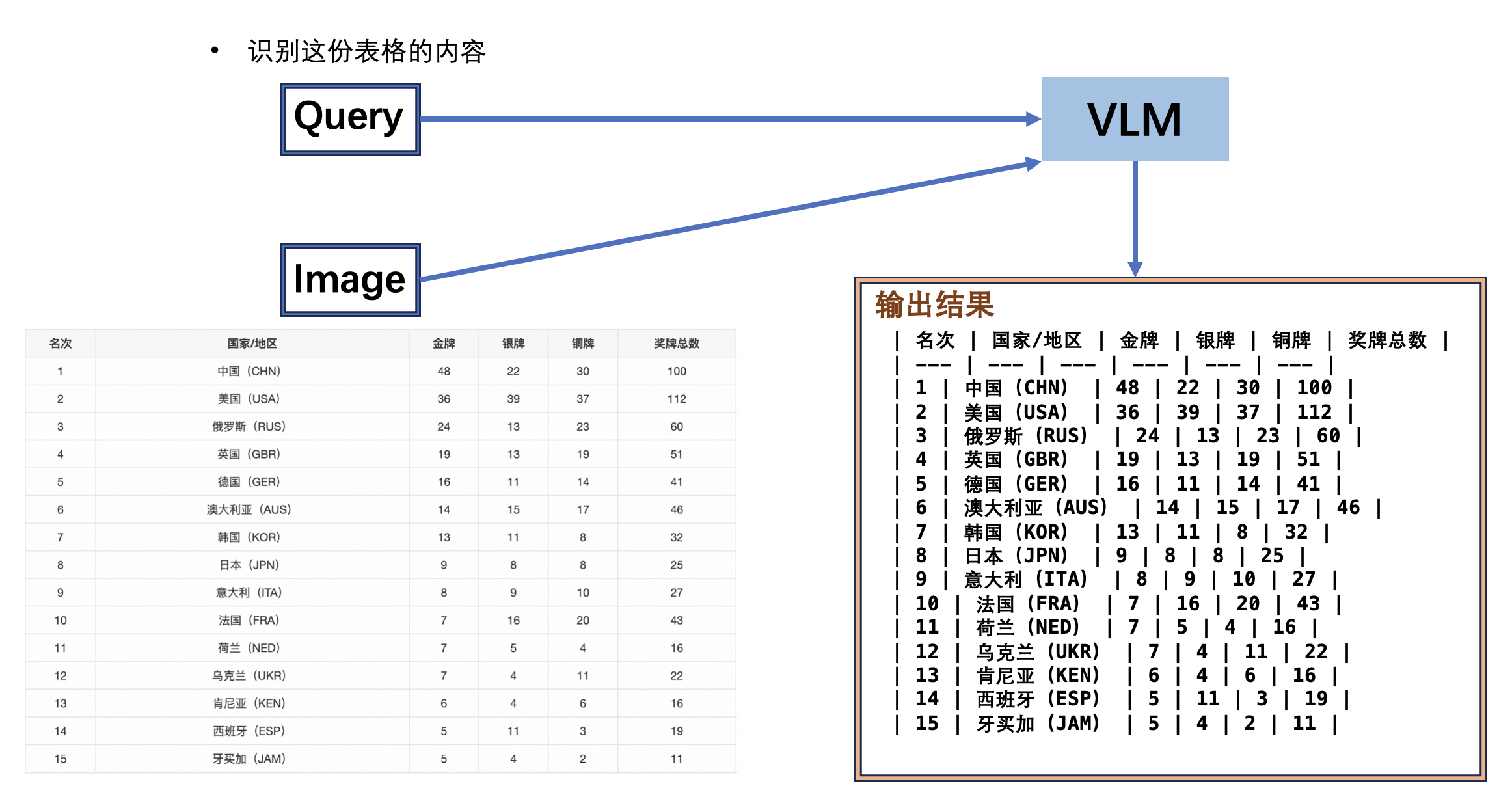
paddleocr doc_understanding -i "{'image': 'https://paddle-model-ecology.bj.bcebos.com/paddlex/imgs/demo_image/medal_table.png', 'query': '识别这份表格的内容,以markdown格式输出'}"
The command line supports more parameter settings, click to expand for a detailed explanation of the command line parameters
| Parameter | Description | Type | Default Value |
|---|---|---|---|
input |
Meaning:Data to be predicted, required. Description: "{'image': 'https://paddle-model-ecology.bj.bcebos.com/paddlex/imgs/demo_image/medal_table.png', 'query': 'Recognize the content of this table and output it in markdown format'}". |
str |
|
save_path |
Meaning:Specify the path for saving the inference result file. Description: If not set, the inference result will not be saved locally. |
str |
|
doc_understanding_model_name |
Meaning:The name of the document understanding model. Description: If not set, the default model of the pipeline will be used. |
str |
|
doc_understanding_model_dir |
Meaning:The directory path of the document understanding model. Description: If not set, the official model will be downloaded. |
str |
|
doc_understanding_batch_size |
Meaning:The batch size of the document understanding model. Description: If not set, the default batch size will be set to 1. |
int |
|
device |
Meaning:The device used for inference. Description: Supports specifying a specific card number:
|
str |
|
paddlex_config |
Meaning:Path to PaddleX pipeline configuration file. | str |
The results will be printed to the terminal, and the default configuration of the doc_understanding pipeline will produce the following output: ```bash {'res': {'image': 'https://paddle-model-ecology.bj.bcebos.com/paddlex/imgs/demo_image/medal_table.png', 'query': '识别这份表格的内容,以markdown格式输出', 'result': '| 名次 | 国家/地区 | 金牌 | 银牌 | 铜牌 | 奖牌总数 |\n| --- | --- | --- | --- | --- | --- |\n| 1 | 中国(CHN) | 48 | 22 | 30 | 100 |\n| 2 | 美国(USA) | 36 | 39 | 37 | 112 |\n| 3 | 俄罗斯(RUS) | 24 | 13 | 23 | 60 |\n| 4 | 英国(GBR) | 19 | 13 | 19 | 51 |\n| 5 | 德国(GER) | 16 | 11 | 14 | 41 |\n| 6 | 澳大利亚(AUS) | 14 | 15 | 17 | 46 |\n| 7 | 韩国(KOR) | 13 | 11 | 8 | 32 |\n| 8 | 日本(JPN) | 9 | 8 | 8 | 25 |\n| 9 | 意大利(ITA) | 8 | 9 | 10 | 27 |\n| 10 | 法国(FRA) | 7 | 16 | 20 | 43 |\n| 11 | 荷兰(NED) | 7 | 5 | 4 | 16 |\n| 12 | 乌克兰(UKR) | 7 | 4 | 11 | 22 |\n| 13 | 肯尼亚(KEN) | 6 | 4 | 6 | 16 |\n| 14 | 西班牙(ESP) | 5 | 11 | 3 | 19 |\n| 15 | 牙买加(JAM) | 5 | 4 | 2 | 11 |\n'}} ``` ### 2.2 Python Script Integration The command line method is for quickly experiencing the effect. Generally, in projects, code integration is often required. You can complete quick inference of the pipeline with just a few lines of code. The inference code is as follows: ```python from paddleocr import DocUnderstanding pipeline = DocUnderstanding() output = pipeline.predict( { "image": "https://paddle-model-ecology.bj.bcebos.com/paddlex/imgs/demo_image/medal_table.png", "query": "识别这份表格的内容,以markdown格式输出" } ) for res in output: res.print() ## Print the structured output of the prediction res.save_to_json("./output/") ``` In the above Python script, the following steps are performed: (1) Instantiate a Document Understanding Pipeline object through
DocUnderstanding(). The specific parameter descriptions are as follows:
| Parameter | Description | Type | Default Value |
|---|---|---|---|
doc_understanding_model_name |
Meaning:The name of the document understanding model. Description: If set to None, the default model of the pipeline will be used. |
str|None |
None |
doc_understanding_model_dir |
Meaning:The directory path of the document understanding model. Description: If set to None, the official model will be downloaded. |
str|None |
None |
doc_understanding_batch_size |
Meaning:The batch size of the document understanding model. Description: If set to None, the default batch size will be set to 1. |
int|None |
None |
device |
Meaning:The device used for inference. Description: Supports specifying a specific card number:
|
str|None |
None |
paddlex_config |
Meaning:Path to PaddleX pipeline configuration file. | str|None |
None |
predict() method of the Document Understanding Pipeline object for inference prediction, which will return a result list.
Additionally, the pipeline also provides a predict_iter() method. Both methods are consistent in terms of parameter acceptance and result return. The difference is that predict_iter() returns a generator that can process and obtain prediction results step by step, suitable for handling large datasets or scenarios where memory saving is desired. You can choose to use either method according to your actual needs.
Below are the parameters and their descriptions for the predict() method:
| Parameter | Description | Type | Default Value |
|---|---|---|---|
input |
Meaning:Data to be predicted, currently only supports dictionary type input Description:
|
Python Dict |
json file:
| Method | Description | Parameter | Type | Parameter Description | Default Value |
|---|---|---|---|---|---|
print() |
Print the result to the terminal | format_json |
bool |
Whether to format the output content using JSON indentation. |
True |
indent |
int |
Specifies the indentation level to beautify the output JSON data, making it more readable, effective only when format_json is True. |
4 | ||
ensure_ascii |
bool |
Controls whether to escape non-ASCII characters into Unicode. When set to True, all non-ASCII characters will be escaped; False will retain the original characters, effective only when format_json is True. |
False |
||
save_to_json() |
Save the result as a JSON format file | save_path |
str |
The path to save the file. When specified as a directory, the saved file is named consistent with the input file type. | None |
indent |
int |
Specifies the indentation level to beautify the output JSON data, making it more readable, effective only when format_json is True. |
4 | ||
ensure_ascii |
bool |
Controls whether to escape non-ASCII characters into Unicode. When set to True, all non-ASCII characters will be escaped; False will retain the original characters, effective only when format_json is True. |
False |
| Attribute | Description |
|---|---|
json |
Get the prediction result in json format |
img |
Get the visualized image in dict format |
API Reference
For the main operations provided by the service:
- The HTTP request method is POST.
- Both the request body and response body are JSON data (JSON object).
- When the request is processed successfully, the response status code is
200, and the response body has the following attributes:
| Name | Type | Meaning |
|---|---|---|
logId |
string |
UUID of the request. |
errorCode |
integer |
Error code. Fixed as 0. |
errorMsg |
string |
Error description. Fixed as "Success". |
result |
object |
Operation result. |
- When the request is not processed successfully, the response body has the following attributes:
| Name | Type | Meaning |
|---|---|---|
logId |
string |
UUID of the request. |
errorCode |
integer |
Error code. Same as the response status code. |
errorMsg |
string |
Error description. |
The main operations provided by the service are as follows:
infer
Perform inference on the input message to generate a response.
POST /document-understanding
Note: The above interface is also known as /chat/completion, compatible with OpenAI interfaces.
- The attributes of the request body are as follows:
| Name | Type | Meaning | Required | Default Value |
|---|---|---|---|---|
model |
string |
The name of the model to use | Yes | - |
messages |
array |
List of dialogue messages | Yes | - |
max_tokens |
integer |
Maximum number of tokens to generate | No | 1024 |
temperature |
float |
Sampling temperature | No | 0.1 |
top_p |
float |
Core sampling probability | No | 0.95 |
stream |
boolean |
Whether to output in streaming mode | No | false |
max_image_tokens |
int |
Maximum number of input tokens for images | No | None |
Each element in messages is an object with the following attributes:
| Name | Type | Meaning | Required |
|---|---|---|---|
role |
string |
Message role (user/assistant/system) | Yes |
content |
string or array |
Message content (text or mixed media) | Yes |
When content is an array, each element is an object with the following attributes:
| Name | Type | Meaning | Required | Default Value |
|---|---|---|---|---|
type |
string |
Content type (text/image_url) | Yes | - |
text |
string |
Text content (when type is text) | Conditionally required | - |
image_url |
string or object |
Image URL or object (when type is image_url) | Conditionally required | - |
When image_url is an object, it has the following attributes:
| Name | Type | Meaning | Required | Default Value |
|---|---|---|---|---|
url |
string |
Image URL | Yes | - |
detail |
string |
Image detail processing method (low/high/auto) | No | auto |
When the request is processed successfully, the result in the response body has the following attributes:
| Name | Type | Meaning |
|---|---|---|
id |
string |
Request ID |
object |
string |
Object type (chat.completion) |
created |
integer |
Creation timestamp |
choices |
array |
Generated result options |
usage |
object |
Token usage |
Each element in choices is a Choice object with the following attributes:
| Name | Type | Meaning | Optional Values |
|---|---|---|---|
finish_reason |
string |
Reason for the model to stop generating tokens | stop (natural stop)length (reached max token count)tool_calls (called a tool)content_filter (content filtering)function_call (called a function, deprecated) |
index |
integer |
Index of the option in the list | - |
logprobs |
object | null |
Log probability information of the option | - |
message |
ChatCompletionMessage |
Chat message generated by the model | - |
The message object has the following attributes:
| Name | Type | Meaning | Remarks |
|---|---|---|---|
content |
string | null |
Message content | May be empty |
refusal |
string | null |
Refusal message generated by the model | Provided when content is refused |
role |
string |
Role of the message author | Fixed as "assistant" |
audio |
object | null |
Audio output data | Provided when audio output is requested Learn more |
function_call |
object | null |
Name and parameters of the function to be called | Deprecated, recommended to use tool_calls |
tool_calls |
array | null |
Tool calls generated by the model | Such as function calls |
The usage object has the following attributes:
| Name | Type | Meaning |
|---|---|---|
prompt_tokens |
integer |
Number of prompt tokens |
completion_tokens |
integer |
Number of generated tokens |
total_tokens |
integer |
Total number of tokens |
An example of a result is as follows:
{
    "id": "ed960013-eb19-43fa-b826-3c1b59657e35",
    "choices": [
        {
            "finish_reason": "stop",
            "index": 0,
            "message": {
                "content": "| 名次 | 国家/地区 | 金牌 | 银牌 | 铜牌 | 奖牌总数 |\n| --- | --- | --- | --- | --- | --- |\n| 1 | 中国(CHN) | 48 | 22 | 30 | 100 |\n| 2 | 美国(USA) | 36 | 39 | 37 | 112 |\n| 3 | 俄罗斯(RUS) | 24 | 13 | 23 | 60 |\n| 4 | 英国(GBR) | 19 | 13 | 19 | 51 |\n| 5 | 德国(GER) | 16 | 11 | 14 | 41 |\n| 6 | 澳大利亚(AUS) | 14 | 15 | 17 | 46 |\n| 7 | 韩国(KOR) | 13 | 11 | 8 | 32 |\n| 8 | 日本(JPN) | 9 | 8 | 8 | 25 |\n| 9 | 意大利(ITA) | 8 | 9 | 10 | 27 |\n| 10 | 法国(FRA) | 7 | 16 | 20 | 43 |\n| 11 | 荷兰(NED) | 7 | 5 | 4 | 16 |\n| 12 | 乌克兰(UKR) | 7 | 4 | 11 | 22 |\n| 13 | 肯尼亚(KEN) | 6 | 4 | 6 | 16 |\n| 14 | 西班牙(ESP) | 5 | 11 | 3 | 19 |\n| 15 | 牙买加(JAM) | 5 | 4 | 2 | 11 |\n",
                "role": "assistant"
            }
        }
    ],
    "created": 1745218041,
    "model": "pp-docbee",
    "object": "chat.completion"
}
Multi-language Service Invocation Examples
Python
OpenAI interface invocation example
import base64
from openai import OpenAI

API_BASE_URL = "http://127.0.0.1:8080"

Initialize OpenAI client

client = OpenAI(

api_key='xxxxxxxxx',
base_url=f'{API_BASE_URL}'


)

Function to convert image to base64

def encode_image(image_path):
  with open(image_path, "rb") as image_file:

return base64.b64encode(image_file.read()).decode('utf-8')


Input image path

image_path = "medal_table.png"

Convert original image to base64

base64_image = encode_image(image_path)

Submit information to PP-DocBee model

response = client.chat.completions.create(

model="pp-docbee",# Choose Model
messages=[
    {
        "role": "system",
        "content": "You are a helpful assistant."
    },
    {
        "role": "user",
        "content":[
            {
                "type": "text",
                "text": "识别这份表格的内容,输出html格式的内容"
            },
            {
                "type": "image_url",
                "image_url": {"url": f"data:image/jpeg;base64,{base64_image}"}
            },
        ]
    },
],


)
content = response.choices[0].message.content
print('Reply:', content)
4. Secondary Development
The current pipeline does not support fine-tuning training and only supports inference integration. Concerning fine-tuning training for this pipeline, there are plans to support it in the future.